Adding the PTO Calendar in Outlook
Depending on your version of Outlook, the first step may look different.
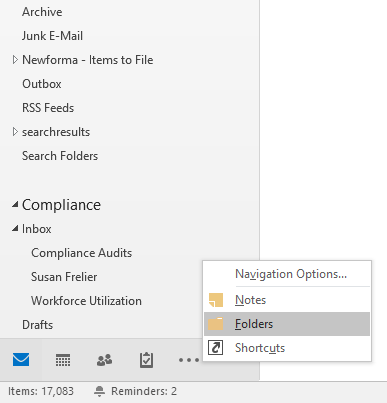
Option 1 - click the More Apps button highlighted below. Click Folders.
Option 2 - click on the three dots ( · · ·
) near the bottom-left corner. Click Folders.
Find Public Folders – yourname@popligroup.com on
the left side. Click the little arrow to expand it, then expand All Public Folders.

Right-click
on PDG Paid time off Calendar. Click
Add to Favorites…
Click Add.
Now, if
you go back to the calendar view, you should see the PTO calendar under Other Calendars.
Related Articles
Create Email Signature Outlook Web App
Guide to Create Email Signature on OWA Prepared for PDG Guide to Create Email Signature on OWA Knowledge Base Prepared For: Popli Design Group PDG 06/12/2018 Revision and Signoff Sheet Change Record Date Author Version Change Reference 06/12/18 ...Emails not being received or sent
Here's what to do if you aren't getting any new emails or if sent mail is stuck in the outbox: Check the Outlook icon at the bottom of your screen. If there's a red circle with an X, then Outlook is in offline mode. To get out of offline mode, click ...Setting up email on your cell phone
We recommend installing the Microsoft Outlook app. Unfortunately, the exact steps will vary depending on the phone manufacturer. Add an account. Choose Exchange if it asks what type of account. Use the same password that you log into your computer ...