Problems after Windows Update/ Internet not working/ No internet after restarting / WiFi Not working
Most of the times after the Windows update, the computer will be restarted automatically to finish installing the updates.
After the reboot, some of your computer components/external devices such as mouse stops working. The reason is Failed Device Driver.
Device Drivers are responsible for integrating any hardware component with the operating system. If the device driver fails or not updated to the latest version, that particular hardware associated with it stops working.
Internet not working/ Ethernet controller adapter driver stops working
On Windows 7,
- Click on Start Menu
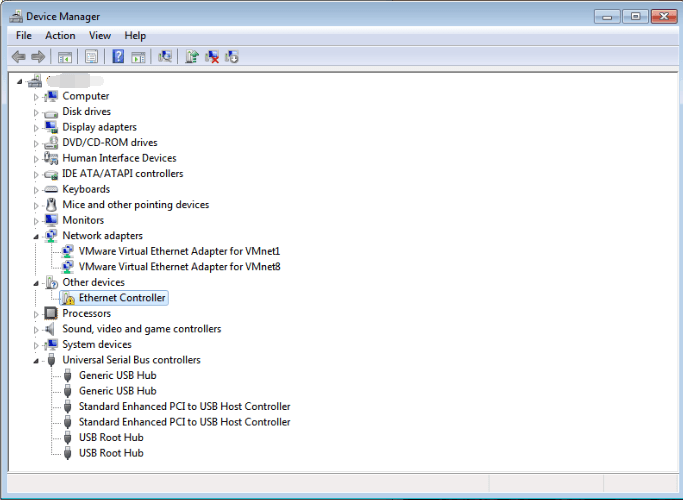
- Type Device Manager and click on it to open the Device Manager dialog box
- Under Other devices, the Ethernet Controller is listed (indicates that the Ethernet Controller has lost its driver after the update/some bug)
- Right click on it and select Update Driver Software
- Select Browse from my computer
- In the browse location, remove everything and leave C:/ and select Include Sub-folders, Click Next
- Windows will automatically find the drivers for you from your computer.
- Once the driver is updated, you will see "Successfully updated the driver"
If the message reads "Failed updating the device software", follow the below steps:
- Go to the shared drive from some other user's computer where the internet is connected and point to Software drive.
- Pick the right driver based on the model number of your Laptop/Desktop from the Driver Software folder and install it
WiFi not working after the update (Windows 7)
- Go to Device Manager
- Right click on Intel Dual band wireless or any other adapter that says wireless
- Choose Update Device Software option and follow the same steps given in the above section to install the software automatically or manually from the C:/ drive.

The above problem was not reported by any Windows 10 users after the update. If you are using windows 10, submit a help desk ticket.
If the above solution is not working, Submit a new ticket to PDG HelpDesk at Support.popli.com
Related Articles
WiFi Login issue in Windows 7
If you are having issues with new WiFi authentication method on Windows 7 follow these steps- 1. Go to Network and sharing center 2. And from there select Manage wireless networks 2. You will see all the available Wireless networks and from them ...WiFi Login issue in Windows 10
If you are having issues with new WiFi authentication method on Windows 10 follow these steps: 1. Go to Network settings option as shown: 2. Click on Wifi option and select Manage known networks: 3. From the available Wireless networks select PDG555 ...Bluebeam print to PDF not working
Bluebeam installs a printer that allows you to print to PDF from any program. Sometimes the Bluebeam printer gets screwed up and stops working. The usual symptom is that the "save as" dialog doesn't pop up after clicking print. To fix it, open the ...Emails not being received or sent
Here's what to do if you aren't getting any new emails or if sent mail is stuck in the outbox: Check the Outlook icon at the bottom of your screen. If there's a red circle with an X, then Outlook is in offline mode. To get out of offline mode, click ...Create Email Signature Outlook Web App
Guide to Create Email Signature on OWA Prepared for PDG Guide to Create Email Signature on OWA Knowledge Base Prepared For: Popli Design Group PDG 06/12/2018 Revision and Signoff Sheet Change Record Date Author Version Change Reference 06/12/18 ...